
Security and Remote Access
Wallpaper Server 2.0.0 intentionally changes the network default and the administrative API access policy. It is not a hardened multi-user application or an internet-ready public upload service. Use loopback, an SSH tunnel, or a trusted private network unless you have a carefully configured external authentication proxy.
Trust boundaries
Section titled “Trust boundaries”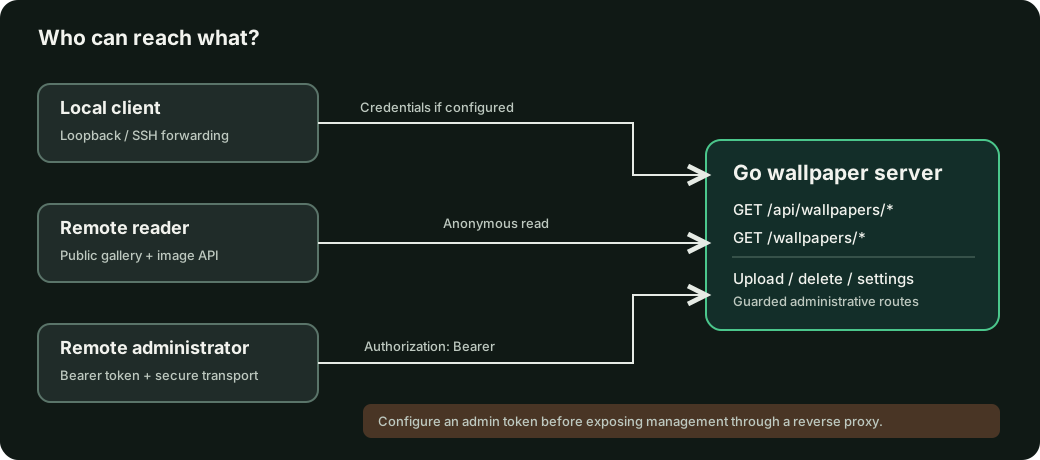
Route access
Section titled “Route access”| Route | Remote without token | Remote with token | Trusted local peer |
|---|---|---|---|
/, /collections, /fragments/gallery, /static/* |
Public UI | Public UI | Public UI |
/wallpapers/*, GET /api/wallpapers* (image, listing, metadata), GET /api/info |
Public, visible images only | Public | Public |
GET /api/health, GET /api/events |
Public | Public | Public |
/manage, /duplicates, /rotation, /settings, /server |
Login redirect | Allowed | Allowed |
GET /api/settings, GET /api/trash*, GET /api/hidden |
401 | Allowed | Allowed |
GET /api/rotation/state, GET /api/rotation/profiles*, GET /api/wallpapers/duplicates |
401 | Allowed | Allowed |
Mutating /api/* routes: uploads, refresh, metadata, collections, rotation selection, trash, settings |
401 | Allowed | Allowed |
The local column applies only when no administrator token is configured:
the immediate peer and Host must both be loopback, with no forwarding headers.
When WALLPAPER_SERVER_ADMIN_TOKEN is set, all administrative callers,
including localhost and SSH-forwarded clients, need the bearer token or a
valid browser session.
The embedded gallery remains publicly readable to everyone who can reach the listener. Images hidden by an administrator and uploads moved to trash are not available through their previous direct image or cache URLs. Gallery pages containing public image metadata must not be treated as private albums.
The authentication mechanism does not implement multi-user permissions, private albums, granular roles, share tokens, or rate limiting.
Recommended: local-only server
Section titled “Recommended: local-only server”server: host: 127.0.0.1 port: 8519wallpaper_folders: - /home/you/Pictures/Wallpapers127.0.0.1 is the default for new configurations. Start the service and
open http://127.0.0.1:8519 on the same computer.
Access over SSH
Section titled “Access over SSH”If the server runs on another machine, forward its loopback interface over SSH, then open the gallery locally:
ssh -N -L 8519:127.0.0.1:8519 your-user@your-server# In a separate terminal:wallpaper-server list --server http://127.0.0.1:8519This also allows access to local-only settings pages while keeping the service’s HTTP listener private. If port 8519 is already occupied locally, use a different local forwarding port on the left-hand side.
Opt-in LAN access
Section titled “Opt-in LAN access”To expose the API to the LAN, change the bind host explicitly:
server: host: 0.0.0.0 port: 8519Restart the service after changing server.host. The network firewall must
also allow the desired clients. Remote read access will now be possible
without authentication; treat every wallpaper as readable by LAN clients.
Remote administration
Section titled “Remote administration”Set a long random token in the server’s process environment before launch:
export WALLPAPER_SERVER_ADMIN_TOKEN='replace-with-a-long-random-secret'wallpaper-server --startThen, from a trusted client:
export WALLPAPER_SERVER_URL=https://wallpapers.example.comexport WALLPAPER_SERVER_ADMIN_TOKEN='replace-with-a-long-random-secret'wallpaper-server upload ./wallpaper.jpgThe service compares the Authorization: Bearer <token> header with the
configured value. Do not put tokens into URLs, share them with browsers in
query strings, or send them over untrusted plaintext HTTP. Use HTTPS with a
trusted reverse proxy or a private encrypted tunnel.
Browser sign-in
Section titled “Browser sign-in”Remote administration is available through /login when
WALLPAPER_SERVER_ADMIN_TOKEN is configured. The login form exchanges the
entered token for an HttpOnly, SameSite=Strict browser cookie. Use HTTPS
for remote browser management; the cookie is marked Secure on remote
connections, and the web server itself does not terminate TLS.
Sessions contain randomized, signed credentials and expire after 12 hours. Signing out clears the browser cookie; rotating the server token invalidates all issued sessions. Previously issued timeless cookies are not accepted.
For the command-line client, a non-loopback HTTP origin with an admin token is
rejected by default. Use HTTPS or SSH tunnelling. The escape hatch
WALLPAPER_SERVER_ALLOW_INSECURE_ADMIN=1 allows plaintext transport only if
you explicitly accept the credential exposure risk; it is not recommended.
Reverse proxy rules
Section titled “Reverse proxy rules”Use TLS termination at the proxy and preserve the client’s Host and scheme. Additional proxy authentication is useful defense in depth. Public gallery and image endpoints remain anonymous; an admin token does not make them private.
Cross-origin mutations carrying a mismatched Origin are rejected. Browser
requests carrying Sec-Fetch-Site: cross-site are rejected for protected
administrative resources even without an Origin header. Non-browser callers
can omit these headers; do not treat them as a replacement for authentication,
secure transport, firewall rules or reverse-proxy access controls.
Docker
Section titled “Docker”Binding to 127.0.0.1 inside a container does not allow host port
forwarding to reach the service. For Docker port publishing, bind to
0.0.0.0 inside the container and publish the port to the host loopback
interface when possible:
docker run -d --name wallpaper-server \ -p 127.0.0.1:8519:8519 \ -v /srv/wallpapers:/app/wallpapers:ro \ -v /srv/wallpaper-config.yaml:/app/config.yaml:ro \ wallpaper-server --start --config /app/config.yamlThe configuration mounted at /app/config.yaml must specify
server.host: 0.0.0.0 and wallpaper_folders: [/app/wallpapers].
Attack surface and current limits
Section titled “Attack surface and current limits”- An upload has a bounded HTTP request body (approximately 50 MiB plus multipart overhead). The scanner and upload pipeline enforce a 100-megapixel decoded image dimension budget before full decoding. Malicious image formats still warrant continuous testing, parser updates and resource monitoring.
- Public metadata excludes the original filesystem path in JSON; image URLs still reveal the image contents to any network client that can reach the server.
- HTTP serves plaintext by default; the service has no built-in TLS.
- Administrative bearer tokens are a shared secret, not a user account.
- No audited rate-limiter, quota system, granular RBAC or OIDC login exists.
- Cached images and original files should be treated as sensitive data.
For upgrade instructions, see Migrating to 2.0. For the exact endpoint matrix, see Endpoints.